Need pricing for multiple items? Send your equipment list on WhatsApp.
IT SupplierPakistan

Computing · Corporate Procurement · Pakistan

Buy Business Laptops in Pakistan for Your Company

Source business laptops for employees, teams and entire offices through a single corporate quotation. Tell us the roles, quantities and requirements, and we will help you specify, price and standardize the fleet.

  • Role-based configurations
  • Bulk quotations
  • Docking + licensing planning
Business laptops configured for company fleets

How do I buy business laptops for a company in Pakistan?

To buy business laptops for a company in Pakistan, define the employee roles the laptops will serve, decide on a small number of standard configurations, and request a written quotation from a corporate IT supplier. Include quantities, CPU, RAM, storage, operating system, warranty and delivery city so the price is accurate and the models are compatible with your docking, software and management tools.

Buying this way, rather than choosing individual models one at a time, keeps the fleet consistent. Consistent fleets are easier to support, easier to secure and cheaper to replace at the end of their life.

01Hardware

What makes a laptop a "business laptop"?

A business laptop is built for managed, long-term use across an organization rather than for a single consumer. The differences show up in areas that matter to IT and procurement:

  • Manageability. Business models are designed to work with fleet deployment and endpoint management tools, and typically ship with Windows Pro editions that support domain and policy management.
  • Security features. Common features include TPM 2.0 for disk encryption and Windows 11 support, fingerprint readers or IR cameras for sign-in, and privacy camera shutters on some models.
  • Build and serviceability. Business ranges commonly use sturdier chassis, better keyboards and easier access to batteries and memory, which lowers downtime.
  • Warranty and support options. Business lines usually offer extended and on-site warranty options that consumer models do not.
  • Model lifecycle. Manufacturers usually keep a business model on sale for a defined period, so you can reorder the same configuration for later hires.

Consumer laptops can look similar on paper and cost less up front. They tend to cost more over the fleet's life because of weaker warranty options, inconsistent availability and limited management support.

Fleet standard

Business laptop profile

  • Windows 11 Pro
  • TPM 2.0 + BitLocker ready
  • Docking + multi-monitor support
  • Defined model lifecycle

02Specifications

Which business laptop suits which employee?

Match the specification to the role. Over-specifying every laptop wastes budget. Under-specifying creates slow machines and early replacements. The table below is a general guide; final specifications depend on your software and how long you plan to keep the devices.

Business laptop specifications by employee role
Employee roleCPU classRAMStorageOther considerations
Administration, reception, HREntry business-class (Intel Core i3/i5 or AMD Ryzen 3/5 class)8–16 GB256–512 GB SSDLightweight, long battery, standard ports
Sales, marketing, general managementMid-range business-class (Core i5/Ryzen 5 class)16 GB512 GB SSDWebcam and microphone quality, battery life, weight
Finance, analysts, IT staffMid to high (Core i5–i7 / Ryzen 5–7 class)16–32 GB512 GB–1 TB SSDMultiple external monitors, Ethernet or dock support, large spreadsheets and virtual machines
Engineers, designers, developersHigh-performance (Core i7 or above / Ryzen 7 class)32 GB or more1 TB SSD or moreDedicated GPU where the software needs it; consider a mobile workstation
Executives and frequent travellersMid to high16–32 GB512 GB–1 TB SSDThin and light, strong battery, premium build, security features

If a role needs sustained GPU or CAD performance, a mobile workstation or desktop workstation is usually a better fit than a standard business laptop. Related: workstations for design and engineering.

Specifications that matter when comparing business laptops

Processor

Choose the CPU class by workload, not by marketing names. Office productivity, browser-based work and video calls run well on mainstream mid-range processors. Data analysis, virtualization, development and design benefit from higher core counts and stronger sustained performance. Check the generation as well as the tier, because a newer mid-range processor can outperform an older high-end one and typically has a longer support window.
RAM

RAM determines how many applications and browser tabs a user can run before the system slows down. 16 GB is a sensible standard for most business users today. Administrative roles with light workloads can manage with 8 GB, though this leaves little headroom over a multi-year lifespan. Confirm whether memory is soldered or upgradeable, because soldered memory cannot be increased later.

Storage

Use SSD storage. 512 GB suits most users. Increase capacity for roles handling large files, local databases or media. Also check the drive type and whether the model supports a second drive slot if you expect storage needs to grow.

Display, weight and battery

Screen size and resolution affect productivity and comfort. 14-inch models balance portability and usability, while 15- and 16-inch models suit desk-based work. For mobile staff, weight and real-world battery life matter more than headline specs. Anti-glare displays help in bright offices.

Ports, docking and connectivity

Check that the laptop has the ports your office uses: USB-C or Thunderbolt for docking and displays, HDMI or DisplayPort output, USB-A for peripherals, and Ethernet (built in or through a dock). Wi-Fi standard and Bluetooth version matter for the network you deploy. Docking stations are model-specific in many cases, so confirm compatibility before ordering docks for a mixed fleet.

Security and management

Confirm TPM 2.0, Windows 11 Pro support, BitLocker capability, and biometric sign-in where policy requires it. Ask whether the models integrate with your endpoint management and deployment tools.

03Software

Operating system, licensing and endpoint management

Business laptops are normally deployed with Windows 11 Pro. Windows Home editions cannot join a corporate domain, so they are unsuitable for managed fleets. Confirm the operating system edition in every quotation line.

Software is part of the same purchase. Decide early whether you need Microsoft 365 or Office licences, security software, and an endpoint management platform to handle patching, inventory and remote support. Endpoint management tools, including the ManageEngine ecosystem, work best when devices are standardized and enrolled from day one.

We can quote laptops together with Microsoft and endpoint management licensing so hardware and software arrive as one plan. See our software licensing solutions.

Software plan

Laptop + licensing package

  • Windows 11 Pro
  • Microsoft 365 / Office options
  • Endpoint management enrollment
  • Quoted with the hardware BOM

Docking stations, monitors and accessories

A laptop rarely works alone in an office. A typical desk setup adds a USB-C or Thunderbolt docking station, one or two external monitors, a keyboard and mouse, and a carry bag or sleeve.

Plan these with the laptops:

  • Dock compatibility with the exact laptop models
  • Power delivery wattage sufficient for the laptop
  • Number and type of monitor outputs the dock provides
  • Ethernet connectivity for stable wired access

We can include monitors and accessories in the same quotation. See our business monitors and accessories.

04Procurement

Warranty, lifecycle and standardization

Warranty terms should be evaluated before price. Confirm the length of warranty, whether it is on-site or carry-in, whether accidental damage cover is available, and how a replacement or repair request is handled.

Most organizations plan a refresh cycle between three and five years, depending on workload and budget. Standardizing on one or two models per role helps with:

  • Faster deployment through a common system image
  • Simpler spare-parts and accessory management
  • Easier troubleshooting and support
  • Predictable replacement planning

If you expect to hire over the next year, ask for models that will remain available so later purchases match the original fleet.

Standardization checklist

  • One or two models per role
  • Common docking and monitor setup
  • Windows Pro + management enrollment
  • Warranty aligned to refresh cycle
  • Reorderable configurations for future hires

Laptops, desktops, mini PCs or workstations?

Laptops are the default for mobile and hybrid work, but they are not always the best choice.

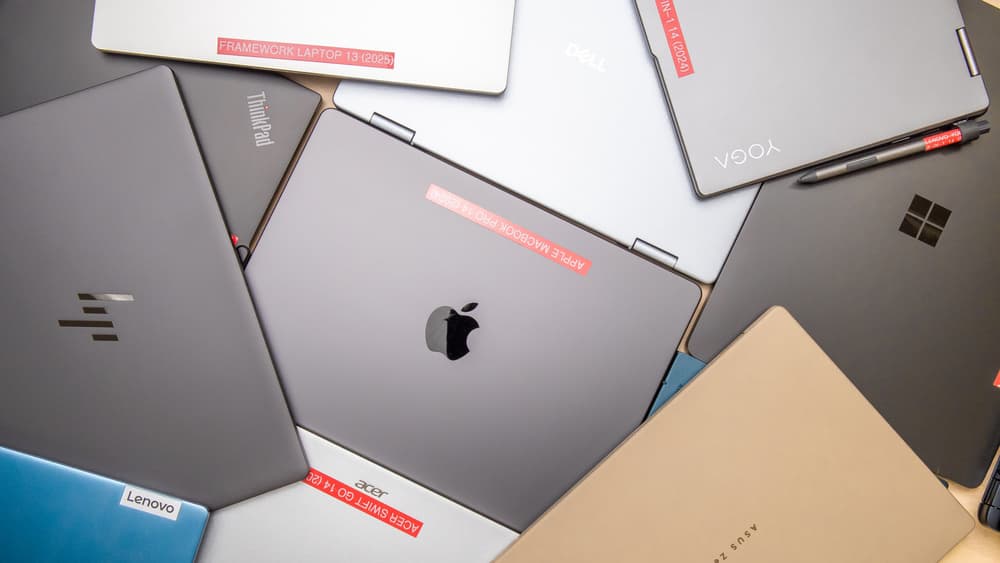
A range of business and professional laptops from multiple brands
When to choose laptops, desktops, mini PCs or workstations
OptionBest forConsiderations
Business laptopHybrid, mobile and flexible seatingHigher cost per performance, battery ageing, theft risk
Business desktopFixed desks, call centers, back-officeLower cost and easier upgrades, not portable
Mini PCSpace-constrained desks, reception, kiosksCompact, needs a separate monitor
WorkstationCAD, rendering, simulation, heavy GPU workHigher cost, specialised specification

Related: business desktop computers and workstations for design and engineering.

Brands and product lines

Business laptops are commonly specified around established enterprise ranges, such as Dell's Latitude line, HP's EliteBook and ProBook lines, and Lenovo's ThinkPad line, along with business models from ASUS and Acer. If your organization already standardizes on a brand, include it in your request. If not, we can propose suitable options based on your roles and budget.

Ordering laptops in bulk

Companies can request bulk laptop quotations for a handful of devices or for large deployments. For the most accurate quote, prepare:

  1. The number of laptops for each role
  2. Preferred brand and model line, if any
  3. Required CPU, RAM, storage and operating system
  4. Docking stations, monitors and accessories needed
  5. Warranty expectations
  6. Delivery city and timeline
  7. Any software licences to include

If you do not have a complete specification, describe the roles and the number of users and we will help shape the requirement.

What should a laptop RFQ include?

A complete laptop RFQ lets the supplier price accurately and check compatibility. Include:

  • Quantities per configuration
  • CPU, RAM, storage and display requirements
  • Operating system edition
  • Ports and connectivity needs
  • Docks, monitors and accessories
  • Security features required (TPM, fingerprint, encryption)
  • Warranty term and support expectations
  • Software and licensing needs
  • Delivery location and timeline
  • Contact person and business email

Corporate RFQ

Ready to request laptop pricing?

Send roles, quantities and any specification you already have. We will review compatibility with docking, licensing and warranty needs.

Request Laptop Pricing →

05FAQ

Frequently asked questions

Practical answers for teams buying business laptops in bulk for offices across Pakistan.

How do I choose laptops for company employees?

Group employees by role, then define one standard specification for each group. Light office roles need a balanced CPU, 8–16 GB RAM and a 256–512 GB SSD, while analysts and technical staff need more memory and storage. Check ports, docking, battery life, security features and warranty before comparing prices.

Can companies purchase laptops in bulk?

Yes. Companies can request bulk quotations for any quantity. Provide the number of devices for each role, the specification, the brand preference, delivery city and any accessories or software required. A bill of materials speeds up the response.

How much RAM does a business laptop need?

Most business users are well served by 16 GB of RAM. Light administrative roles can run on 8 GB, but this leaves little headroom as software grows. Users running virtual machines, large spreadsheets or design tools should consider 32 GB or more.

Should business laptops run Windows 11 Pro or Home?

Business laptops should generally run Windows 11 Pro. It supports domain join, group policy, BitLocker and other management and security features that Windows Home does not provide for corporate environments.

What warranty should I look for on business laptops?

Look for a warranty length that matches your refresh cycle, on-site service where available, and optional accidental damage cover for mobile staff. Confirm how repairs and replacements are handled before you order.

Can you supply laptops with software and accessories?

Yes. Laptops can be quoted together with docking stations, monitors, accessories and software licensing so the whole workstation is planned in one document. Availability depends on the models and licences you select.

Corporate IT Procurement

Send your laptop requirement, receive a corporate quotation

Share the roles, quantities and any specification you have. Our team will review the details and respond with pricing.

Request Laptop Pricing

Pre-selected for business laptops. Include roles, quantities, preferred brands and any docking or licensing needs.

Quote form temporarily unavailable

Send your company name, quantities and equipment list on WhatsApp or by email. Those are the only ways to request a quote right now.

WhatsAppEmail